10.1 VLAN案例设计


系列 - 案例设计
目录
摘要
本实验旨在通过构建一个复杂的企业网络拓扑,帮助学生掌握VLAN的高级配置技能,包括多交换机环境下的VLAN划分、主干链路配置以及不同型号交换机的互联。通过完成本实验,学生将能够理解并应用企业级网络中的VLAN设计原则。
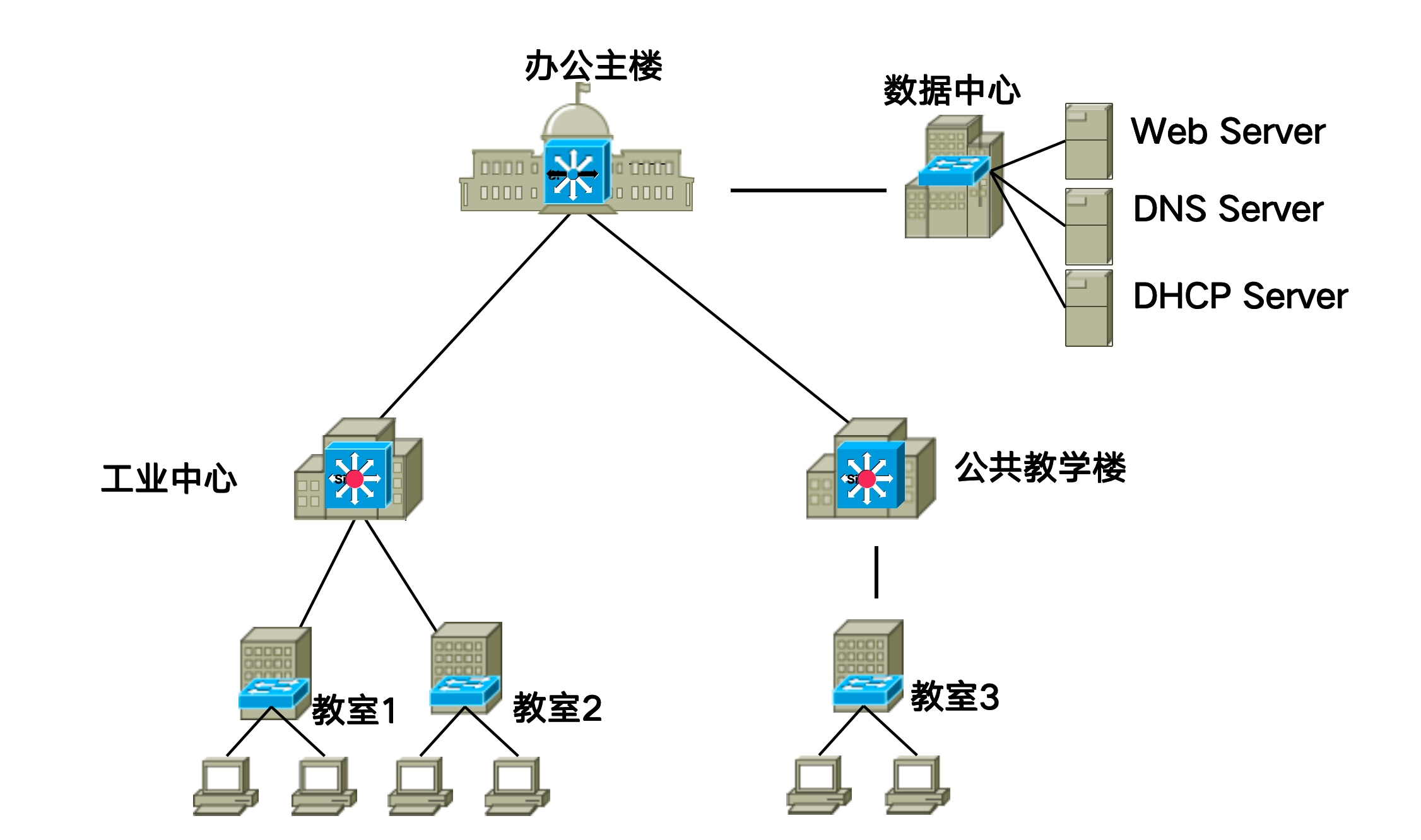
任务
实现各个楼之间互连,为了简化起见,设计时省略主楼和办公楼中的终端,每个教室中用两台终端作为示例。完成VLAN划分和端口配置,实现VLAN内部通信。
关键命令
在VLAN配置过程中,有时需要撤销或修改已有的配置。华为交换机提供了undo命令来实现这一功能。以下是一些常用的撤销操作:
撤销接口类型设置
# 设置接口类型为 access
port link-type access

# 撤销接口类型设置
undo port link-type
撤销接入端口
# 设置接口类型为 access,并划分给 vlan 2
port link-type access
port default vlan 2

# 撤销上述操作
undo port default
undo port link-type
撤销主干端口
# 设置接口类型为 trunk,并将接口共享给 vlan 2 和 vlan 3
port link-type access
port trunk allow-pass vlan 2 3

# 撤销上述操作(先撤销共享,再撤销类型)
undo port allow-pass vlan 2 3
undo port link-type
配置顺序
在撤销配置时,通常需要按照与配置相反的顺序进行。例如,先撤销VLAN分配,再撤销端口类型。这样可以避免因依赖关系导致的错误。
实验要求
- 根据“设备类型表”及“拓扑图”,使用 eNSP 软件建立拓扑
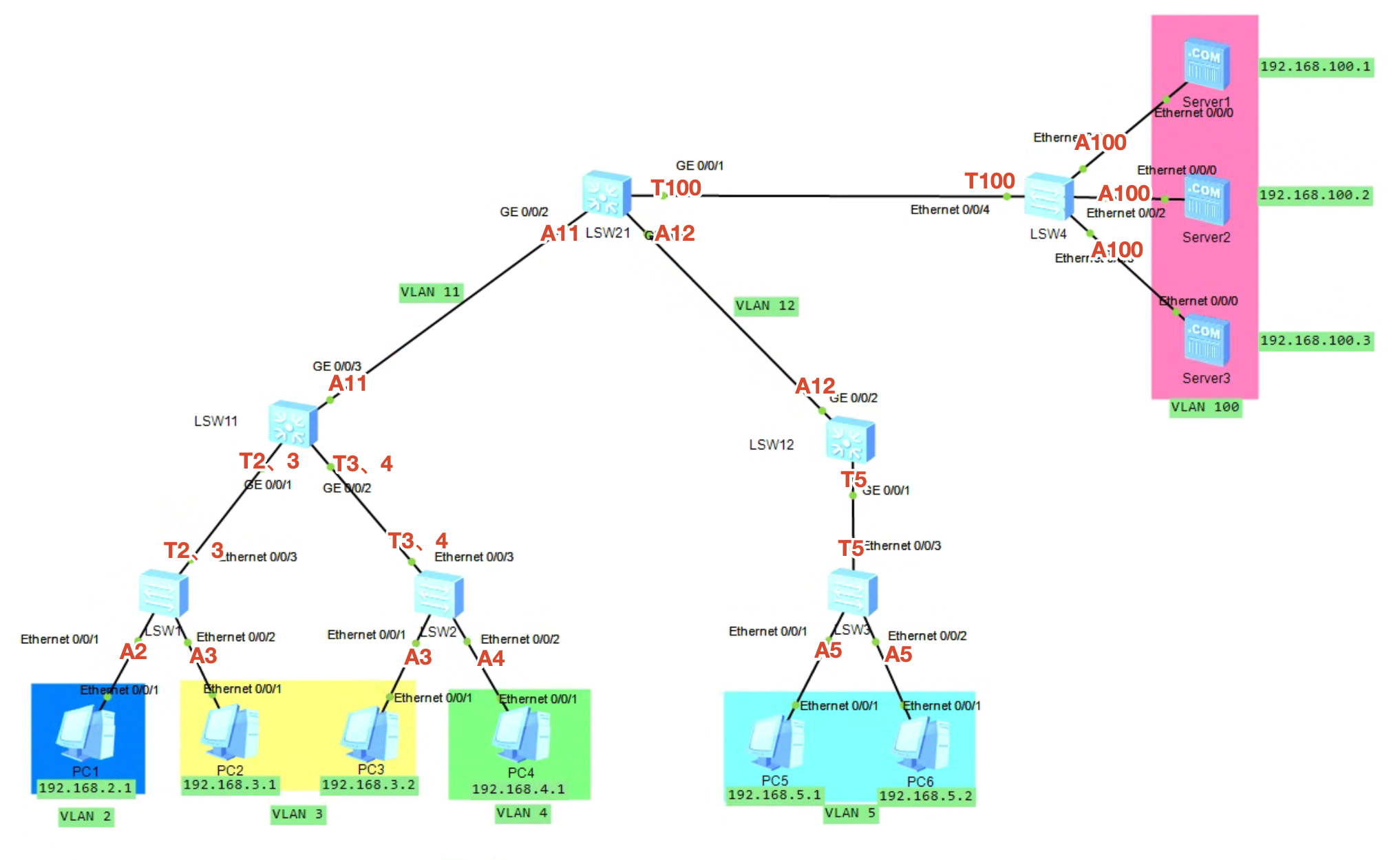
- 根据“VLAN与交换机端口映射表”及“拓扑图”,划分 VLAN
- 配置 PC 和 Server 的 IP 地址
设备类型表
| 类型 | 设备名 |
|---|---|
| 终端 PC | PC1 ~ 10 |
| 交换机 S3700 | LSW1 ~ 4 |
| 交换机 S5700 | LSW11、LSW12、LSW21 |
| 终端 Server | Server1 ~ 3 |
拓扑图
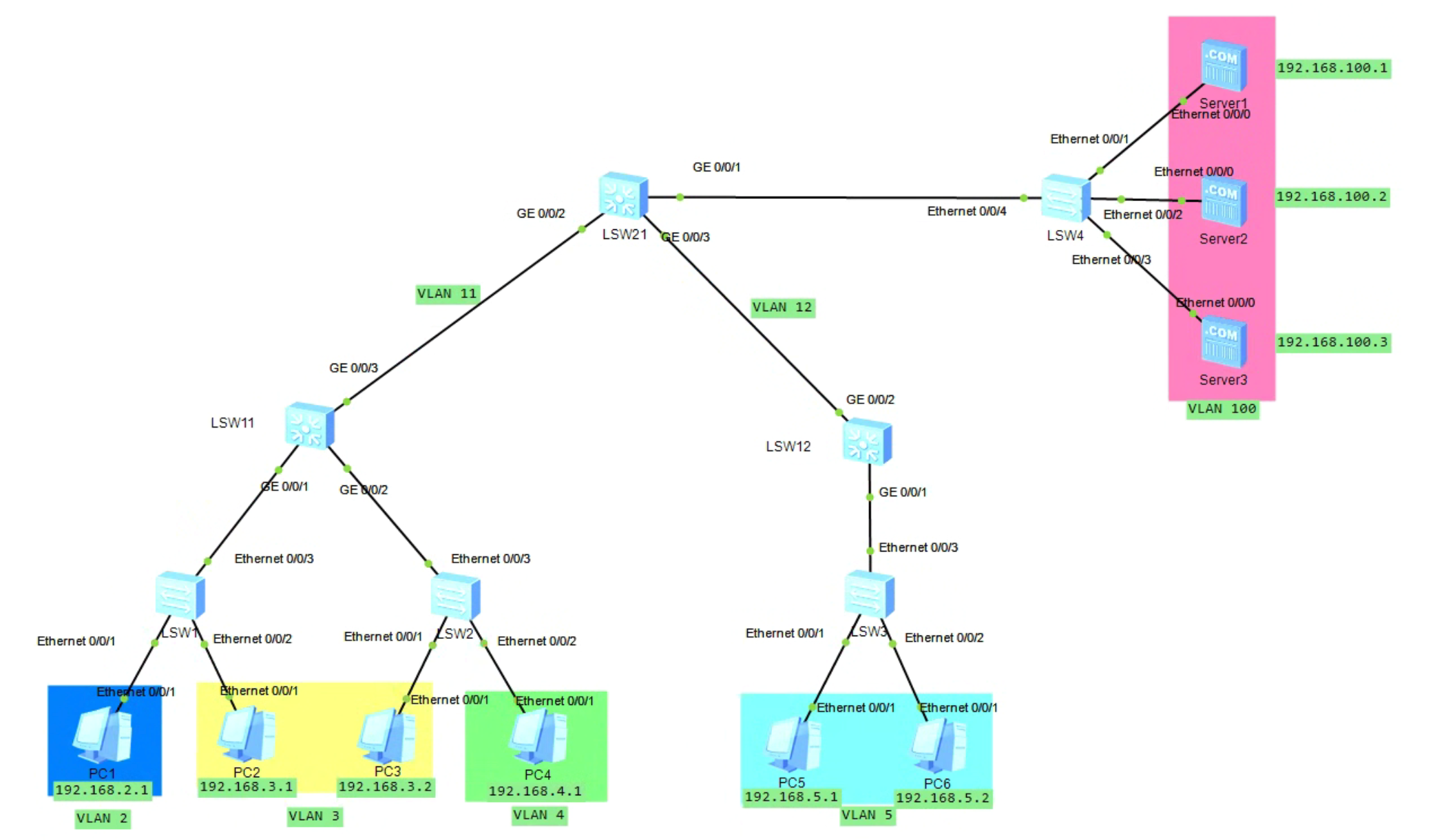
接口类型说明
S5700 系列交换机(LSW11、LSW12、LSW21)的接口名称以
GigabitEthernet 开头,这是千兆以太网接口。而 S3700 系列交换机的接口名称以 Ethernet 开头。在配置时需要使用正确的接口名称。VLAN与交换机端口映射表
配置详情
LSW1
# 进入系统视图并关闭信息中心
system-view
undo info-center enable

# 创建 VLAN
vlan batch 2 3

# 配置接口
interface e0/0/1
port link-type access
port default vlan 2
quit

interface e0/0/2
port link-type access
port default vlan 3
quit

interface e0/0/3
port link-type trunk
port trunk allow-pass vlan 2 3
quit
LSW2
# 进入系统视图并关闭信息中心
system-view
undo info-center enable

# 创建 VLAN
vlan batch 3 4

# 配置接口
interface e0/0/1
port link-type access
port default vlan 3
quit

interface e0/0/2
port link-type access
port default vlan 4
quit

interface e0/0/3
port link-type trunk
port trunk allow-pass vlan 3 4
quit
LSW3
# 进入系统视图并关闭信息中心
system-view
undo info-center enable

# 创建 VLAN
vlan batch 5

# 配置接口
interface e0/0/1
port link-type access
port default vlan 5
quit

interface e0/0/2
port link-type access
port default vlan 5
quit

interface e0/0/3
port link-type trunk
port trunk allow-pass vlan 5
quit
LSW4
# 进入系统视图并关闭信息中心
system-view
undo info-center enable

# 创建 VLAN
vlan batch 100

# 配置接口
interface e0/0/1
port link-type access
port default vlan 100
quit

interface e0/0/2
port link-type access
port default vlan 100
quit

interface e0/0/3
port link-type access
port default vlan 100
quit

interface e0/0/4
port link-type trunk
port trunk allow-pass vlan 100
quit
LSW11
# 进入系统视图并关闭信息中心
system-view
undo info-center enable

# 创建 VLAN
vlan batch 2 3 4 11

# 配置接口
interface g0/0/1
port link-type trunk
port trunk allow-pass vlan 2 3
quit

interface g0/0/2
port link-type trunk
port trunk allow-pass vlan 3 4
quit

interface g0/0/3
port link-type access
port default vlan 11
quit
LSW12
# 进入系统视图并关闭信息中心
system-view
undo info-center enable

# 创建 VLAN
vlan batch 5 12

# 配置接口
interface g0/0/1
port link-type trunk
port trunk allow-pass vlan 5
quit

interface g0/0/2
port link-type access
port default vlan 12
quit
LSW21
# 进入系统视图并关闭信息中心
system-view
undo info-center enable

# 创建 VLAN
vlan batch 11 12 100

# 配置接口
interface g0/0/1
port link-type trunk
port trunk allow-pass vlan 100
quit

interface g0/0/2
port link-type access
port default vlan 11
quit

interface g0/0/3
port link-type access
port default vlan 12
quit